UTM parameters help you understand where your traffic is coming from. They can illuminate dark traffic, track paid campaigns and pinpoint which content drives results.
Plausible Analytics has full UTM tag support out-of-the-box.
Already know UTM tags and just need to build a link? Use the UTM builder. Already have a link? Use the UTM checker to validate it.
- What does UTM stand for?
- How do I see UTM campaign stats in Plausible Analytics?
- How do I generate UTM tagged links?
- UTM tag builder
- Types of UTM parameters
- Why are UTM parameters so valuable?
- Best practices for UTM tags and other things to know
- Never use UTMs on internal links
- UTM tags are case-sensitive
- Plausible merges UTM tags that are identical to referral sources
- You cannot use spaces in UTM tags
- Plausible converts plus signs into spaces
- Note the standard URL syntax for query strings
- Have a consistent campaign naming convention
- How to test UTM parameters
- Try Plausible UTM campaign tracking
What does UTM stand for?
UTM stands for Urchin Tracking Module. Urchin was an analytics company Google acquired in 2005 and turned into Google Analytics. The UTM parameter format they introduced became the standard and is now supported by all major analytics tools.
A lot of website traffic doesn’t have a referrer header. This traffic is called dark traffic. You may know it as “Direct / None” in your Plausible Analytics dashboard.
Dark traffic includes clicks from emails, clicks from documents, clicks from mobile messengers, bookmarks, people typing in the URL directly into the browser and many other mechanisms. Site owners cannot see which referrer sources are sending that traffic.
By default, Plausible Analytics attempts to uncover traffic originating from Android apps which is traditionally categorized as direct traffic in Google Analytics and other analytics tools.
The volume of “android-app” entries in your Plausible “Top Sources” report will vary based on your site and audience. For sites with significant mobile traffic, this recovers 10% or more previously unattributed traffic from apps like Gmail, Slack and Telegram.
Tagging your links with UTM parameters is a solution to minimize dark traffic even further.
How do I see UTM campaign stats in Plausible Analytics?
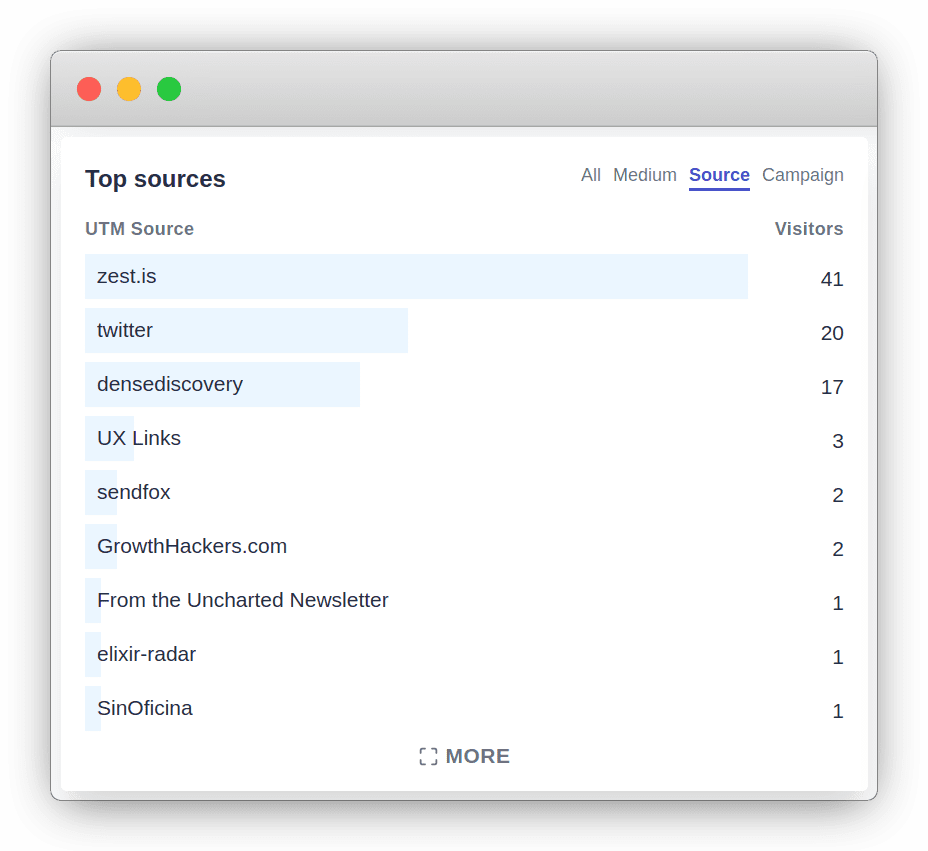
When you have UTM tagged links in your emails, social media and other platforms, you can see clicks on these links in your Plausible Analytics dashboard. You can see referral sources of your traffic, even those that would otherwise be listed as “Direct / None”:
-
In your “Campaigns” report you can filter by UTM Medium, UTM Source, UTM Campaign, UTM Term and UTM Content tabs which include all the visits to your sites from tagged links.
-
You can click on any of your individual UTM tags to drill down and get a full report based on that specific UTM tag:
- See which content on your site is visited by people that clicked on the links tagged with that UTM
- See which of your goals and events people that click on tagged URLs convert on
- See details about visitors that click on the tagged URLs such as what country they are from and what device, browser and OS they use
Build and validate UTM links before you publish with our free tools
How do I generate UTM tagged links?
UTM parameters are bits of text that you add to your URLs and links that you share. Here’s what a link looks like when it’s tagged with UTM parameters:
https://yourdomain.com?utm_medium=social&utm_source=linkedin&utm_campaign=milestone
UTM parameters are all the tags that come after the question mark (?) in the URL above:
- utm_medium=social
- utm_source=linkedin
- utm_campaign=milestone
Individual parameters are separated by the ampersand (&) symbol.
You can tag all your links manually or use the builder below.
UTM tag builder
Use the Plausible UTM builder to generate tagged links without doing it manually. It flags naming issues as you type and shows exactly how each parameter will appear in your Plausible dashboard. Already have a link? Use the UTM checker to validate it and get a clean version ready to use.
Types of UTM parameters
UTM parameters consist of:
UTM Source
utm_source: The name of the campaign source where you plan to share the link. Such as the name of your newsletter or the name of the social network you’re doing a campaign on.
The utm_source parameter is required. Make sure to use it in all UTM tagged links.
UTM Medium
utm_medium: The name of the channel where the link is placed. Such as email or paid social media posts.
You can organize and group utm_medium tags within a few of your main marketing strategies:
- “email” for all email marketing campaigns
- “social” for organic content posted on your social media channels
- “paid-social” for paid campaigns posted on social media
- “cpc” for pay per click advertising such as search engine paid advertising
- “display” for any advertising banner campaigns you run on other websites
- “affiliate” for all affiliate marketing campaigns
- “referral” for all organic campaigns on other websites
UTM Campaign
utm_campaign: The name of your individual campaign. Such as “November+newsletter” or “Black+Friday+sale”.
utm_campaign is the most flexible of all the UTM tags. You can put anything you want. Launches, sales, features, specific topics…
UTM Term
utm_term: The name of the keyword for your paid search ad campaign.
UTM Content
utm_content: The name of the specific link.
In some campaigns, you may have multiple links pointing to the same location. For instance two different links to your landing page in an email. utm_content allows you to differentiate between these two links and see which one performs best.
Why are UTM parameters so valuable?
UTM parameters help you understand the big picture and referral sources that bring traffic to your site. But they also help you understand the small details such as what specific social media content works best in terms of driving conversions. Here are some use cases where UTMs can make a difference:
Track your dark traffic
Facebook is a big source of traffic for many websites but the Facebook referrer only includes the fact that the visitor came from Facebook. Facebook never sends the post or comment ID where someone clicked. You can get this data by including UTM tags in the links you share on Facebook.
Instagram is similar: links shared in posts, stories and bios often arrive with no useful referrer context. UTM tags are the only reliable way to identify which Instagram content drove a click.
Track your email marketing campaigns
Any clicks on links in emails, whether personal or newsletters, are classified as “direct / none”. UTM tags are the right tool for understanding your email traffic.
Any links that you include in any of your emails should be tagged. At the top level, you can use utm_source=email to see how many visitors you’re getting from emails.
But you can go even further. For instance, you could track clicks on the link you have placed in your email signature:
?utm_medium=email&utm_source=personal&utm_campaign=signature
Or you could track individual newsletter that you send out to your subscribers:
?utm_medium=email&utm_source=my-newsletter&utm_campaign=november-edition
For email newsletter campaigns, a useful naming convention could be to include the date the email was sent and the subject line as your utm_campaign tag.
Note that many email platforms like Mailchimp, ConvertKit and HubSpot can auto-generate UTM parameters for links in your campaigns. Check your platform’s settings before tagging links manually.
Compare paid vs organic social media activities
Social media typically sends dark traffic referrals. So by tagging the content you share in social media, you can bring light to some of your activities.
One way to do that would be to tag all your organic (non-paid) social media links with a utm_medium=social tag and all your paid social media posts with a utm_medium=paid-social tag.
This will show a clear split in your website referral traffic between visitors and activity coming from “social” and “paid-social”. It makes it easier to analyze and understand the results you’re getting from your campaigns.
Check the results of each individual social media post
You can go even deeper than the paid vs organic social media split. You could analyze each individual post that you share using the utm_campaign tags. Here’s an example:
https://yourdomain.com?utm_medium=paid-social&utm_source=facebook&utm_campaign=black-friday-sale
Or:
https://yourdomain.com?utm_medium=social&utm_source=facebook&utm_campaign=new-season-announcement
This lets you see the difference between paid and organic posts, and compare the results of individual campaigns side by side.
Analyze influencers, affiliates and creators you’re sponsoring
UTM tags are useful in the world of affiliate marketing, influencer marketing and other sponsorships such as when sponsoring a specific newsletter.
Tag all the links they post with unique UTM tags so you can measure what results each drives, compare them and decide which are worth continuing.
Analyze your guest blogging and content syndication campaigns
In content marketing, companies do many guest blogging and content syndication campaigns. Some of these are hard to track as some websites don’t send a referral header. UTM tags are a solution to these.
Simply tag all the links in the different guest posts and other syndication activities to be able to see how many clicks and other results they drive.
Best practices for UTM tags and other things to know
Never use UTMs on internal links
Only tag links that point to your site from external sources. If you add UTM parameters to links within your own site, it overwrites the original referral source for that session. A visitor who arrived from your newsletter will suddenly appear as a new direct visit when they click an internally tagged link. This corrupts your traffic attribution data.
UTM tags are case-sensitive
UTM tags are case-sensitive so utm_source=LinkedIn and utm_source=linkedin will show separately in the “UTM Source” tab in the Campaigns report of your Plausible dashboard.
Be consistent in your UTM naming practices. Keep all the tag names consistent to keep your dashboard clean and tidy and make it easier to analyze results.
Plausible merges UTM tags that are identical to referral sources
We merge all identical sources in the “All” tab of the “Top Sources” report in your Plausible Analytics dashboard.
For instance, clicks from LinkedIn that are not tagged by UTMs are labeled with the referral source LinkedIn. If you tag links you share on LinkedIn with utm_source=linkedin, we merge those clicks alongside other LinkedIn clicks in the “All” tab to give you a combined view.
If you want to isolate your UTM tagged clicks from organic clicks, use the “UTM Source” tab in the Campaigns report, which shows only traffic from tagged links.
You cannot use spaces in UTM tags
You cannot just include utm_medium=paid social as spaces are not supported. Either call it utm_medium=paid-social, utm_medium=paid+social or utm_medium=paid%20social.
Plausible converts plus signs into spaces
We recommend the plus sign or %20 as Plausible will automatically convert those into spaces. For instance, if you use social+paid or social%20paid in your links, it will be displayed as social paid in your Plausible Analytics dashboard.
Note the standard URL syntax for query strings
As explained earlier, to specify query parameters you start with a ? and follow each consecutive parameter with &. If you use the question mark twice, the first part is ignored and only the last part is used.
So try to avoid URLs with more than a single question mark in them. If the URL already has a question mark in it, simply use the ampersand symbol instead of the initial question mark at the start of your UTM.
Have a consistent campaign naming convention
Do you see too many campaign names and other sources in your UTM report? Is it difficult to get a good overview? Try to create a better and more consistent campaign naming convention for you and your team.
Keeping utm_source consistent from platform to platform lets you see all activity in one place. If you tag all links you share on Facebook with utm_source=facebook, you can filter by that source in your Plausible dashboard.
That becomes impossible if you mix Facebook, facebook and facebook-paid across different links.
How to test UTM parameters
If you get no traffic from links tagged with UTM parameters, then your UTM report in Plausible Analytics will be empty.
In order to test whether your UTM tagged link works, simply click on it and check your Plausible Analytics dashboard. Your visit should immediately show on the dashboard.
Note that in Plausible Analytics the referral sources are counted only when they start a new session so you won’t be able to use this method to test your links multiple times each day. Our session length is one day long.
Try Plausible UTM campaign tracking
Plausible Analytics includes UTM campaign tracking out-of-the-box. You get a 30-day free trial with no credit card required. Start your free trial →